AI Photo Editing Prompts: 40 Copy-Paste Prompts That Keep Your Face Looking Like You
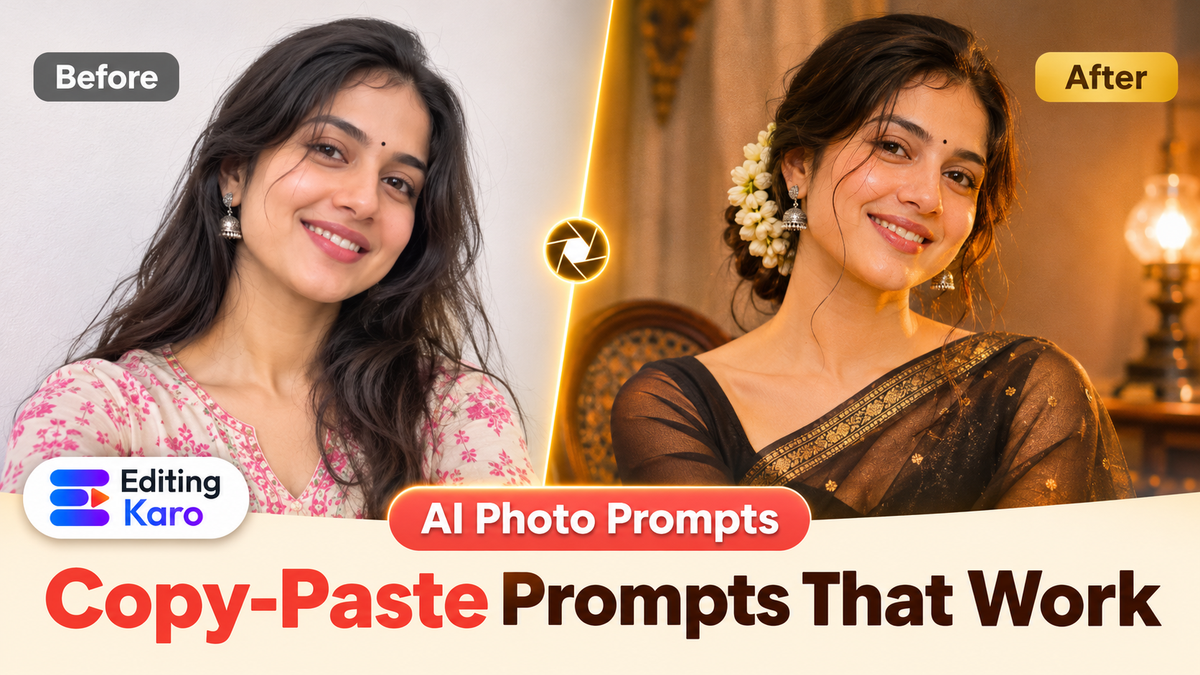
You found a prompt on Instagram, pasted it into an AI app with your best selfie, and got back a stranger in a lovely saree. Same outfit as the viral post, wrong face. Annoying.
The problem is almost never the app. It's the prompt. Most copy-paste AI photo editing prompts describe the outfit beautifully and forget to say the one thing that matters: keep this person's face. This guide fixes that. You'll get a simple formula, 40 original prompts you can copy, and the fixes for the problems everyone hits.
Take an illustrative case we'll follow through this guide: Riya, a college student in Indore, wants a retro saree portrait for her Instagram profile from a phone selfie taken on her hostel balcony.
How AI photo editing prompts work
When you upload a photo and type an instruction, the model treats your photo as a reference. It tries to follow your words while borrowing what it can from the picture. Google describes its Gemini image model, nicknamed Nano Banana, as built to keep a person's likeness consistent across edits (Google's announcement). But "tries" is the key word. If your prompt is vague, the model fills the gaps with its own guesses, and faces are the first thing to drift.
So every good prompt has three parts:
| Part | What it says | Example |
|---|---|---|
| Keep | What must not change | "Keep my face, expression, hairstyle and pose exactly the same." |
| Change | The outfit, place or style | "Dress me in a red Banarasi silk saree with gold border, standing on a heritage haveli balcony." |
| Look | Light, camera and finish | "Warm golden hour light, 85mm portrait lens, soft film grain, natural skin texture." |
Copy that structure and you'll rarely need anything fancier. For Riya, the keep line stays the same in every attempt; only the change and look lines move.
Step 1: Pick the right photo
The photo decides half the result.
- Face large in the frame. A chest-up photo beats a full-body shot from across the room.
- Even light. Daylight from a window is perfect. Harsh overhead light and night photos make the model invent detail.
- No filters. Beauty filters smooth your skin and the model copies that plastic look.
- Looking roughly at the camera. Profiles and sunglasses make likeness harder.
Riya's first selfie was taken at night under a tube light, so her face came out flat and grainy. She retook it the next morning by the window, phone at eye level, and that single change did more than any prompt tweak.
Quick tip: If your only photo is old or soft, run it through AI Image Restore first, then edit the restored version.
Step 2: Copy a prompt and fill the brackets
Replace anything in square brackets with your own details. Keep the first sentence as it is. Each prompt is short on purpose: one keep line, one change line, one look line. If a prompt below is close to what you want but not quite, swap a single phrase rather than adding five more.
Retro saree and Bollywood portraits
- 1Keep my face, expression and pose exactly the same. Turn this into a 1970s Bollywood film portrait: a [black chiffon] saree, jasmine in my hair, warm tungsten light from the side, soft film grain, deep shadows behind me.
- 2Keep my face and smile unchanged. Dress me in a [red Banarasi silk] saree with a gold border and temple jewellery, standing by a carved wooden window, golden hour light, 85mm portrait.
- 3Keep my face exactly the same. Vintage studio portrait from the 1960s, pastel [mint] saree with a sleeveless blouse, puffed hairstyle, plain painted backdrop, faded colour photo look.
- 4Keep my face, hairstyle and pose. A [yellow cotton] saree in a mustard field at sunrise, light mist, wind in the pallu, cinematic wide shot, natural skin texture.
- 5Keep my face exactly the same. Monsoon portrait in a [teal georgette] saree under a black umbrella on a rainy Mumbai street, wet reflections, neon shop signs blurred behind.
Portraits for men
- 1Keep my face, beard and hairstyle exactly the same. Formal studio portrait in a [navy] three-piece suit, plain grey backdrop, soft key light, sharp focus on the eyes.
- 2Keep my face and expression unchanged. Cinematic street portrait at night in [Old Delhi], wearing a black kurta, warm shop lights, shallow depth of field, 35mm film look.
- 3Keep my face exactly the same. 1990s Bollywood hero poster style, denim jacket, sunglasses pushed up on my head, dramatic sunset sky, slight film grain.
- 4Keep my face, beard and pose. Leaning against a [vintage black car] on a hill road, golden hour light, wind in my hair, realistic photo.
- 5Keep my face unchanged. Traditional look in a [cream] sherwani with a maroon stole, palace courtyard behind me, soft daylight, wedding portrait style.
- 6Keep my face and smile exactly the same. Casual travel photo on a [Goa] beach at sunset in a linen shirt, candid moment, warm natural colours.
Aesthetic and lifestyle portraits
- 1Keep my face, expression and hairstyle. Soft window-light portrait in a cosy café, holding a cup of chai, warm muted colours, film grain, natural skin texture.
- 2Keep my face exactly the same. Rooftop portrait at blue hour with fairy lights behind me, wearing a [white] kurta, dreamy bokeh.
- 3Keep my face and pose unchanged. Library aesthetic: sitting by tall bookshelves, cardigan and glasses, warm lamp light, editorial magazine photo.
- 4Keep my face exactly the same. Black and white portrait with strong side light, high contrast, classic studio look, visible skin texture.
- 5Keep my face and smile. Flower market portrait surrounded by marigolds and roses, morning light, colourful but natural, 50mm lens.
Couple photo edits
Only edit couple photos when both people have agreed. For more detail, see AI couple photo editing.
- 1Keep both faces, our expressions and the pose exactly the same. Put us on a beach at sunset, golden light, waves behind us, the woman on the left in a [red] saree, the man in a [white] kurta.
- 2Keep both faces and the pose unchanged. Turn us into a 1980s film poster couple, warm grainy colours, hand-painted poster style, no text.
- 3Keep both faces exactly the same. Rainy evening in [Shimla], sharing one umbrella, warm street lamps, soft mist, cinematic.
- 4Keep both faces and the pose. Wedding look: the woman in a [maroon] lehenga, the man in a [gold] sherwani, mandap with marigold garlands behind us, soft evening light.
- 5Keep both faces unchanged. Turn us into a 3D animated movie style couple sitting on a moon, stars around, cute and colourful.
Festival photos
- 1Keep my face and pose exactly the same. Christmas portrait beside a decorated tree with warm fairy lights, wearing a [red] sweater, cosy living room, soft glow.
- 2Keep my face unchanged. New Year's Eve rooftop party, sparklers in my hand, city lights behind, glitter in the air, festive but realistic.
- 3Keep my face exactly the same. Makar Sankranti on a terrace, flying a colourful kite, bright blue sky with many kites, warm afternoon sun.
- 4Keep my face and pose. Republic Day portrait with a small Indian flag, soft saffron, white and green bokeh behind me, respectful and natural.
- 5Keep my face unchanged. Pongal morning in a [silk] pavadai or veshti beside a decorated kolam and a clay pot, soft sunlight.
3D, cartoon and art styles
- 1Keep my likeness. Turn me into a 3D collectible figurine standing on a round base, packaging box with my name area left blank behind it, studio lighting.
- 2Keep my face recognisable. Studio-style anime portrait, soft watercolour background of a quiet town, gentle colours.
- 3Keep my likeness. Classic oil painting portrait in a gold frame, rich brush texture, dark background, museum lighting.
- 4Keep my face recognisable. Pixar-style 3D character, big friendly eyes, same hairstyle and outfit colours, simple pastel background.
- 5Keep my likeness. Indian miniature painting style, flat colours, decorative border, me seated in a garden.
- 6Keep my face recognisable. Comic book cover style, bold ink lines and halftone dots, dynamic pose, no text.
Professional and work photos
- 1Keep my face, hairstyle and expression exactly the same. LinkedIn headshot: [charcoal] blazer, plain light grey background, soft even light, friendly confident look.
- 2Keep my face unchanged. Speaking on a conference stage with a microphone, blurred audience lights, professional event photo.
- 3Keep my face exactly the same. Working at a clean modern desk with a laptop and plants, morning light, natural candid look.
- 4Keep my face and pose. Doctor's portrait in a white coat with a stethoscope, bright clinic background, warm and trustworthy.
Fix-up prompts
- 1Keep everything the same, but replace the background with a plain white wall. Natural shadow under me.
- 2Keep my face and outfit. Change the light to warm golden hour from the left, keep it realistic.
- 3Keep everything else the same and remove the person in the background on the right.
- 4Keep my face exactly the same and make the photo sharper and clearer, natural skin texture, no smoothing.
For plain fixes like the last four, a dedicated tool is often faster than a prompt: the background remover, remove object from photo and AI photo enhancer do one job each.
Step 3: Generate a few, then change one thing at a time
Generate two to four versions on your first try. When one is close, keep that prompt and change one detail: the light, the colour of the saree, the place. Changing three things at once makes it impossible to tell what helped.
Here is how Riya's edit improved over three tries:
| Version | Prompt | What happened |
|---|---|---|
| Weak | "Make me in a saree, aesthetic" | New face, random saree, flat light |
| Better | "Keep my face the same. Red silk saree, balcony, golden hour." | Face mostly kept, but skin looks smooth |
| Strong | "Keep my face, expression and pose exactly the same. Red Banarasi silk saree with gold border, carved wooden balcony, warm golden hour light from the left, 85mm portrait, natural skin texture." | Recognisable, believable light, real texture |
Common problems and quick fixes
- Face changes: move "keep my face exactly the same" to the very start, and use a closer, sharper photo.
- Plastic skin: add "natural skin texture, visible pores, no smoothing".
- Extra fingers or odd hands: regenerate, or ask for "hands relaxed by my side".
- Wrong saree drape or jewellery: name it plainly, "Nivi drape", "temple jewellery", "small gold jhumkas".
- Text in the image is misspelt: don't ask the model for text. Add it later in Pixel Studio with add text to photo.
For prompts that create images from scratch rather than edit a photo, our AI image prompts guide has a full formula. If you want the finished portrait to move, the image to video guide shows how to animate a still without the strange warping.
Privacy and labels: the boring part that matters
When the saree trend went viral in September 2025, several Indian police units warned people about fake apps and fraud riding on it (The Week's report). Sensible rules:
- Use tools you recognise, from the official app store or website.
- Never upload ID cards, children's photos or private pictures.
- Edit only yourself, or people who said yes.
- Remember that edits can carry watermarks. Google says images made or edited in the Gemini app include an invisible SynthID watermark (Google's post).
- Label realistic edits when you post. Our guide to AI labels on YouTube and Instagram explains when it's required.
AI photo editing in Editing Karo
You can run every prompt above in Vision Studio without switching apps.
| Task | Where | How |
|---|---|---|
| Edit your photo with a prompt | Image desk | Pick a model that accepts a reference image, such as Nano Banana Pro, Nano Banana 2 or GPT Image, add your photo, paste the prompt |
| Check the cost first | Image desk | Each model shows its credit cost before you press Generate |
| Add names, dates or a caption | Pixel Studio | Send the image to a design and add text in any font |
| Remove or replace a background | Pixel Studio | Background Remover and Replace Background |
| Turn the photo into a short clip | Video desk | Image to video, then add music in Motion Studio |
Riya's whole job takes one sitting in Editing Karo: the edit on the Image desk, her name in a script font in Pixel Studio, and a five-second moving version for her story from the Video desk.
Every Editing Karo account gets free monthly credits and can try every model, and paid plans include more. The Image desk docs explain reference images and ratios. The reason to do it here rather than in a chat app: the edit, the text on top and the Reel made from it all live in one tab.
Your five-minute checklist
- 1Pick a sharp, close, unfiltered photo.
- 2Copy one prompt and fill the brackets.
- 3Keep "keep my face exactly the same" as the first line.
- 4Generate two to four versions and change one detail at a time.
- 5Add text afterwards, and label realistic edits when you post.
Open the Image desk, add your photo and try prompt 2 first. It's the one that most reliably keeps a face while changing everything around it.
Frequently asked questions
What is an AI photo editing prompt?
It is a written instruction that tells an AI image model how to change a photo you upload. A good one says what must stay the same, usually your face and pose, and what should change, such as the outfit, background, light or art style.
Can I copy and paste these prompts into Gemini?
Yes. They are written in plain English and work in the Gemini app and in other tools that accept a reference photo. Replace the details in brackets, like the colour of the saree or the city, with your own.
Why does the AI change my face?
Most often because the prompt never told it to keep the face, or the photo is small, blurry or taken from far away. Start with 'keep my face exactly the same', use a sharp close photo, and avoid filters and sunglasses.
Which photo works best for AI photo editing?
A sharp, well-lit photo where your face is large in the frame and you look roughly at the camera. Daylight from a window works well. Group photos, heavy beauty filters and photos taken at night make faces drift.
Are AI photo editing prompts free to use?
The prompts themselves are free to copy. Whether the edit is free depends on the tool: some apps have daily limits, others use credits. In Editing Karo every account gets free monthly credits and each model shows its cost first.
What is the Nano Banana saree trend?
It was a viral 2025 trend in India where people uploaded a selfie to Google's Gemini image model, nicknamed Nano Banana, and asked for a vintage Bollywood-style saree portrait. The retro saree prompts in this guide are original takes on that style.
Is it safe to upload my photo to AI editing apps?
Use well-known tools, read what they do with uploads, and never upload ID cards, children's photos or anything private. In September 2025 several Indian police units warned users about fake apps and fraud linked to AI photo trends.
Do AI-edited photos have a watermark?
Many do. Google says images made or edited in the Gemini app carry an invisible SynthID watermark, and some tools add a visible mark too. Treat any realistic edit as AI-made and label it when you post.
Do I need to label an AI-edited photo on Instagram?
If the edit looks realistic and could mislead people, yes. Instagram and YouTube ask creators to label realistic AI-made or AI-altered content. A stylised cartoon or obvious fantasy edit usually needs no label, but adding one costs nothing.
What are good AI photo editing prompts for boys?
Formal studio portraits, cinematic street shots, vintage film looks and sports-car or bike scenes work well. Describe the outfit, the place and the light, and always ask the model to keep your face, beard and hairstyle unchanged.
What are good AI photo editing prompts for girls?
Retro saree portraits, festive lehenga looks, soft aesthetic window-light portraits and travel scenes are popular. Name the fabric and colour, the jewellery and the light, and ask the model to keep your face and smile exactly the same.
Can I edit a couple photo with AI?
Yes, with models that accept a reference photo. Say what stays, both faces and the pose, and what changes, such as a beach at sunset or wedding outfits. Only edit couple photos when both people have agreed.
Why do AI edits look plastic or fake?
Over-smoothed skin, perfect symmetry and flat lighting cause the plastic look. Ask for 'natural skin texture, visible pores, soft shadows' and a real camera style such as '35mm film' or '85mm portrait' to get a more believable result.
How long should an AI photo editing prompt be?
Usually two to four sentences. One sentence for what to keep, one or two for the change, and one for light and style. Very long prompts with dozens of adjectives often confuse the model and change things you wanted to keep.
Can AI fix the hands in my edited photo?
Often, yes. Generate again, or add 'natural hands with five fingers, relaxed pose' to the prompt. If one version is perfect apart from the hands, crop them out or pick a pose where the hands are hidden.
What is the difference between AI photo editing and AI image generation?
AI image generation creates a picture from words alone. AI photo editing starts from a photo you upload and changes parts of it, so the person can stay recognisable. Editing needs a model that accepts a reference image.
AI photo editing prompt kaise likhe?
Pehle likho kya same rahega, jaise face aur pose, phir kya badalna hai, jaise saree, jagah ya light. Prompt English mein likhna safest hai, kyunki zyada tar image models English instructions sabse achhe se samajhte hain.
Can I use these prompts for a festival photo?
Yes. The festival prompts in this guide cover Christmas, New Year, Makar Sankranti and Republic Day. Keep decorations simple and accurate, and avoid adding religious symbols you would not use in real life.
Can I edit photos with AI in Editing Karo?
Yes. Open the Image desk in Vision Studio, choose a model that accepts a reference image, such as Nano Banana Pro or GPT Image, add your photo, paste a prompt and check the credit cost before you generate.
Can I add text to an AI-edited photo?
Yes. AI models still misspell words, so add names, dates and captions afterwards in a design editor. In Editing Karo you can send the image to Pixel Studio and add text in any font before you download it.